Private session tracking

Every session.
Every game.
One honest record.

Record the session while it happens, keep the details that matter, and turn your history into a private performance record you can actually understand.

Poker and casino table games · Private to your account · Import and export included

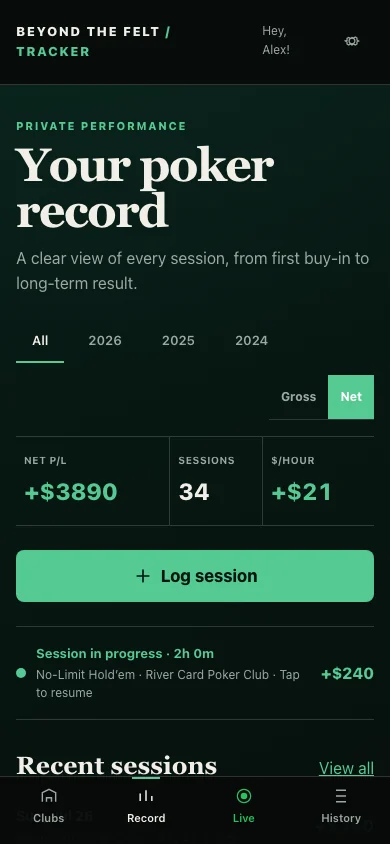
Beyond the Felt tracker home screen showing net profit, session count, hourly result, an active session, and recent sessions
YOUR RECORD AT A GLANCEREAL PRODUCT · ILLUSTRATIVE DATA

01 · Capture the session

From first buy-in to final cash-out.

The tracker works before, during, and after play. Start with the game details, update the session live, then return to any record later.

LOG A SESSION

Record the game, money, time, and setting.

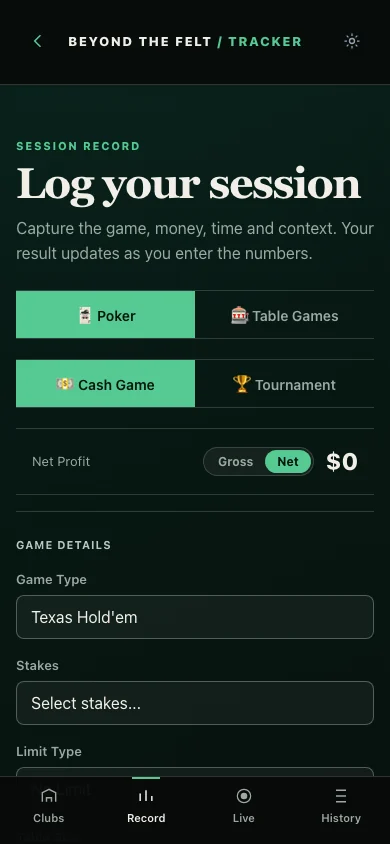
Choose poker or a casino table game, cash or tournament, then add the exact game type, stakes, buy-in, cash-out, location, timing, and optional context.

  • Poker and casino-specific entry flows
  • Cash games and tournaments
  • Saved or custom locations
  • Gross and net result views
Log your session screen with Poker and Table Games modes, cash game and tournament choices, net profit, and game details
SESSION ENTRYREAL PRODUCT · ILLUSTRATIVE DATA
LIVE SESSION

Keep the running record open while you play.

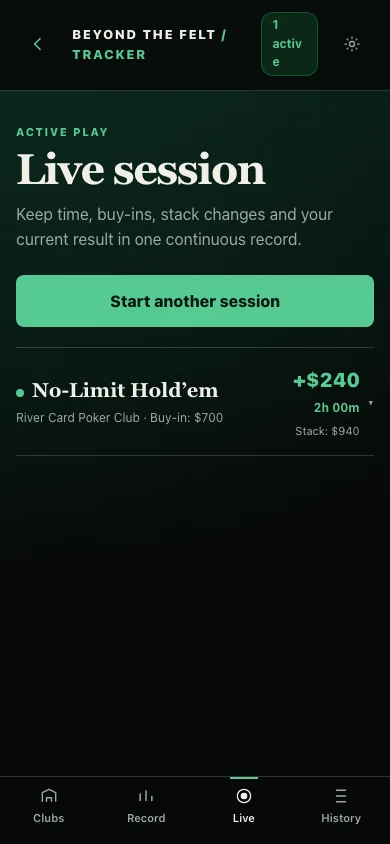
Start a live session, add rebuys as they happen, monitor the current stack and result, and close the session with the final cash-out when play ends.

  • Running time and active-session status
  • Buy-ins, rebuys, and stack updates
  • Resume from the tracker home screen
  • End and save without rebuilding the night
Live session screen showing a poker session in progress with current profit, duration, buy-in, and stack
ACTIVE PLAYREAL PRODUCT · ILLUSTRATIVE DATA
SEARCHABLE HISTORY

Every saved session stays findable.

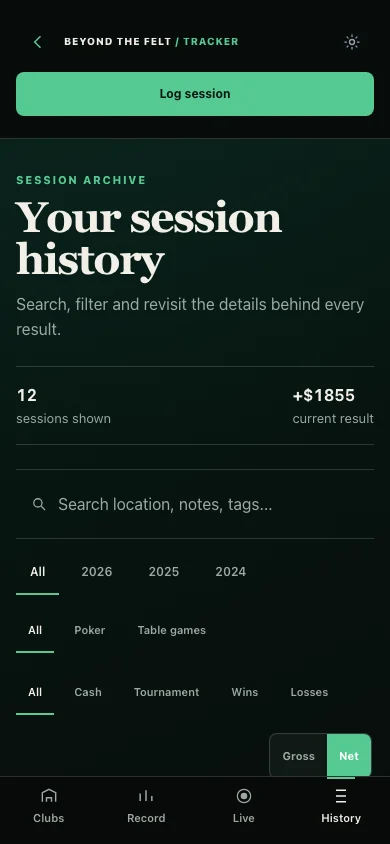
Search locations, notes, or tags. Filter by year, poker or table games, cash or tournament, and wins or losses—then open the original session for full detail.

  • Year and date-range filters
  • Game and format filters
  • Search across notes, tags, and locations
  • Edit or revisit the complete record
Session history screen with search, year, game category, cash or tournament, and win or loss filters
SESSION ARCHIVEREAL PRODUCT · ILLUSTRATIVE DATA

02 · Understand performance

One result becomes a pattern only when you can see the whole record.

Move from summary statistics to cumulative performance, moving averages, and game-by-game comparisons without turning the tracker into a prediction engine.

THE SCORECARD

Start with the numbers that define your history.

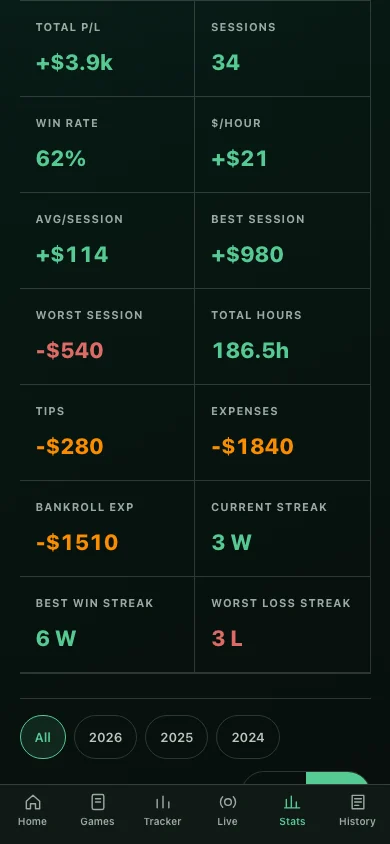
Review sessions, win rate, hourly performance, average result, best and worst sessions, hours, expenses, and current or longest streaks across clear year filters.

Tracker statistics screen showing profit, sessions, win rate, hourly result, average session, best and worst sessions, expenses, hours, and streaks
LIFETIME STATISTICSREAL PRODUCT · ILLUSTRATIVE DATA
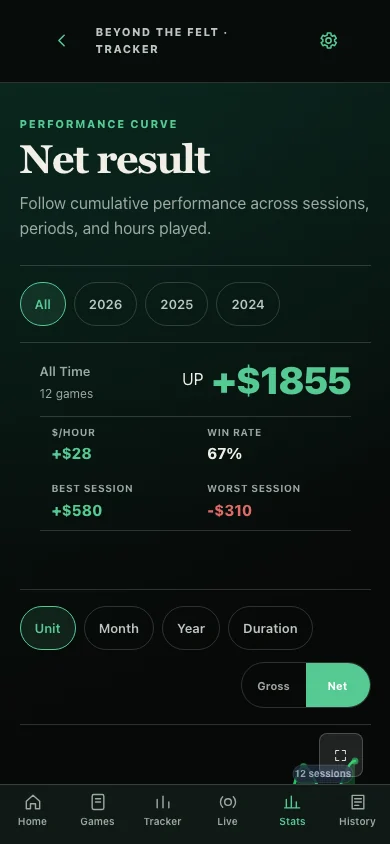
Net result performance curve with session, period, and duration controls plus gross and net views
NET RESULT CURVEREAL PRODUCT · ILLUSTRATIVE DATA
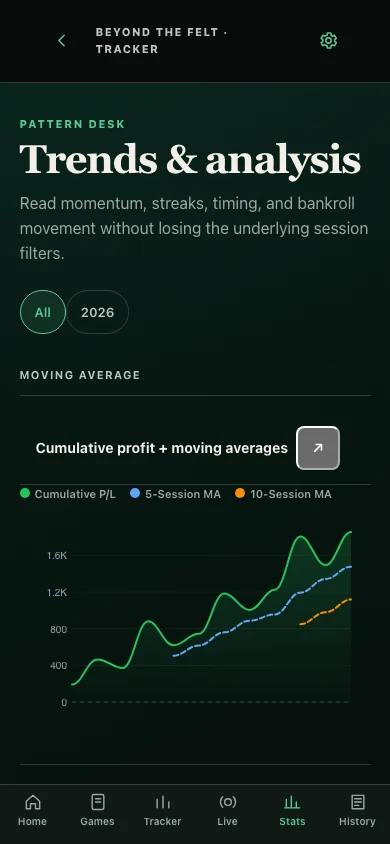
Trends and analysis screen showing cumulative profit and five-session and ten-session moving averages
MOVING AVERAGESREAL PRODUCT · ILLUSTRATIVE DATA
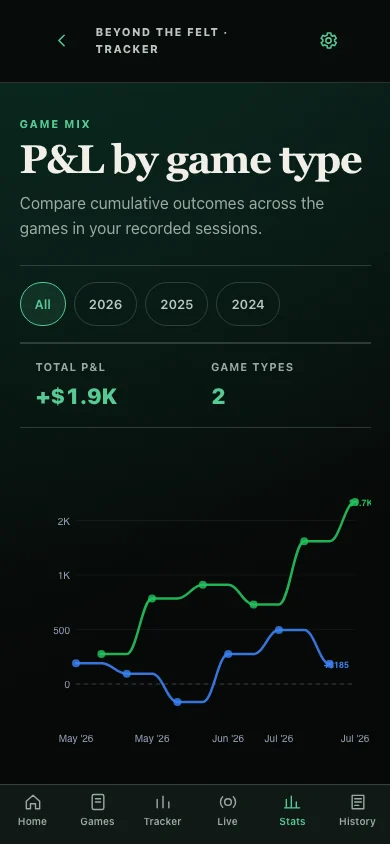
Profit and loss by game type chart comparing two recorded game types
GAME-TYPE BREAKDOWNREAL PRODUCT · ILLUSTRATIVE DATA
Win rate and average sessionGross or net performanceMoving averagesGame type and stakesLocations and timingWinning and losing streaks

03 · Preserve the context

The number matters. So does what happened around it.

Keep the costs, reads, hands, and shared action that explain more than the final result alone.

EXPENSE LEDGER

Separate play from the costs around it.

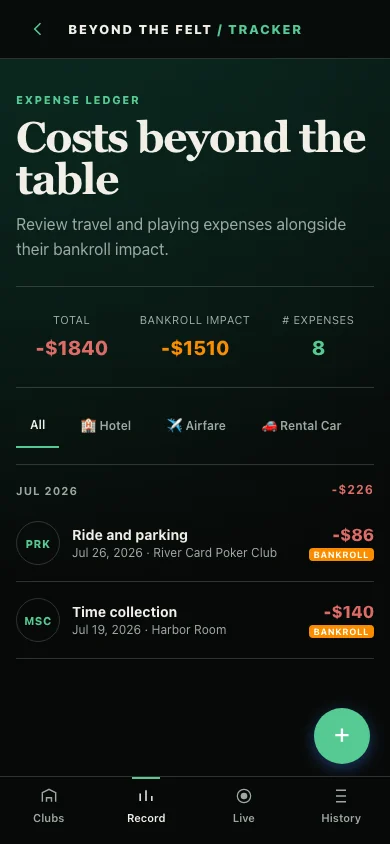
Track tips, meals, travel, hotels, and other expenses—with control over whether each cost affects bankroll profit.

Expense ledger showing categorized travel and playing expenses with bankroll impact
EXPENSESREAL PRODUCT · ILLUSTRATIVE DATA
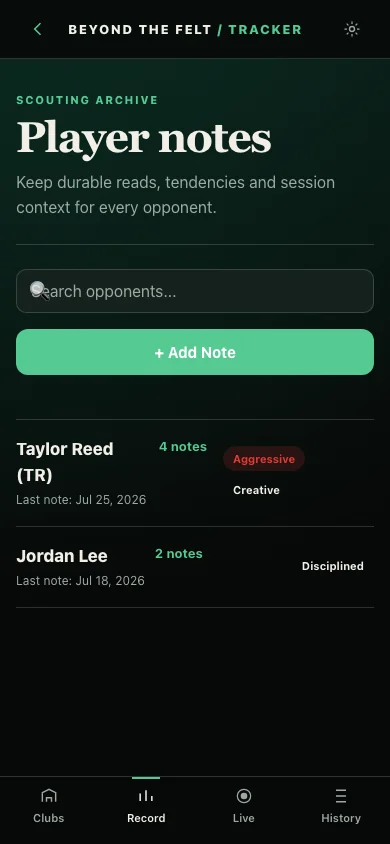
PLAYER NOTES

Keep private reads organized.

Save opponent notes, tags, tendencies, and links back to relevant sessions.

Private player notes screen with fictional opponent names, note counts, and tags
PLAYER NOTESREAL PRODUCT · ILLUSTRATIVE DATA
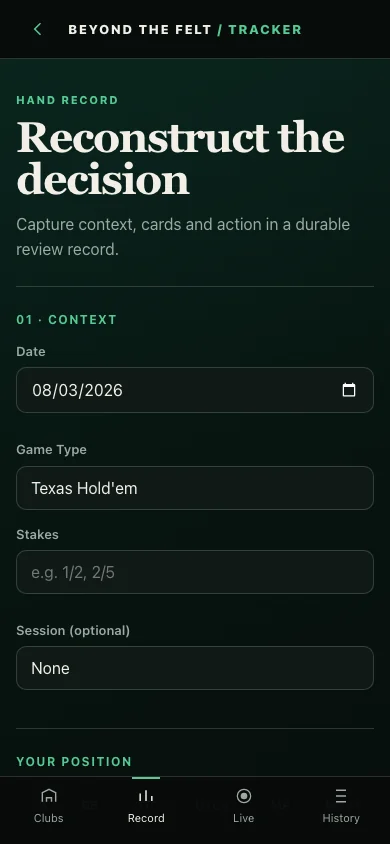
HAND JOURNAL

Reconstruct decisions worth studying.

Capture position, cards, action, board, result, and your reasoning in a durable hand record.

Hand journal entry screen for date, game type, stakes, session, position, cards, action, and analysis
HAND RECORDREAL PRODUCT · ILLUSTRATIVE DATA
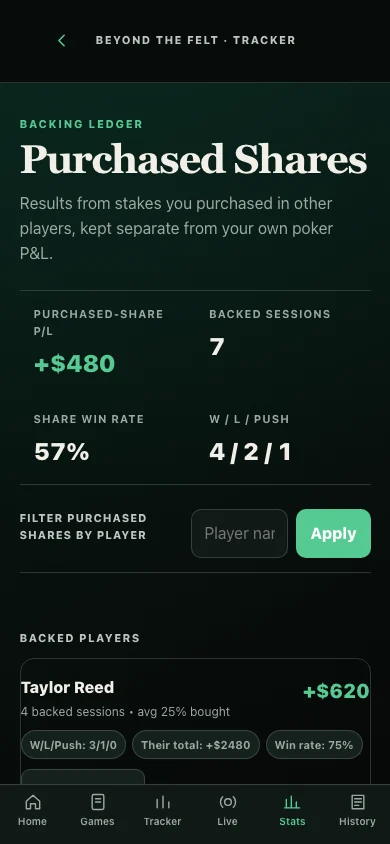
PURCHASED SHARES

Keep someone else’s action separate from your own play.

Track purchased shares by player and session, including win, loss, push, percentage bought, and total shares P/L.

Purchased shares ledger for filtering backed-player results separately from personal poker profit and loss
BACKING LEDGERREAL PRODUCT · ILLUSTRATIVE DATA

04 · Own your data

Bring the history in. Take the archive with you.

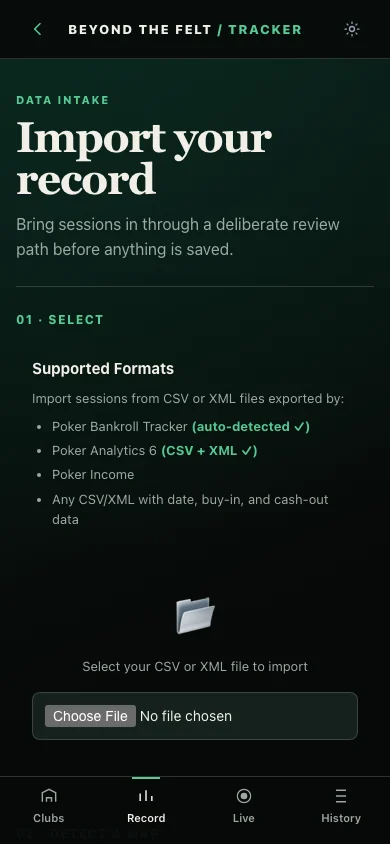
Import existing session records through a deliberate review flow and export a portable archive whenever you want a copy outside the tracker.

Import your record screen showing supported poker tracker and CSV or XML formats
IMPORTREAL PRODUCT · ILLUSTRATIVE DATA
IMPORT

Start with the history you already have.

Review supported formats and the incoming records before anything is saved.

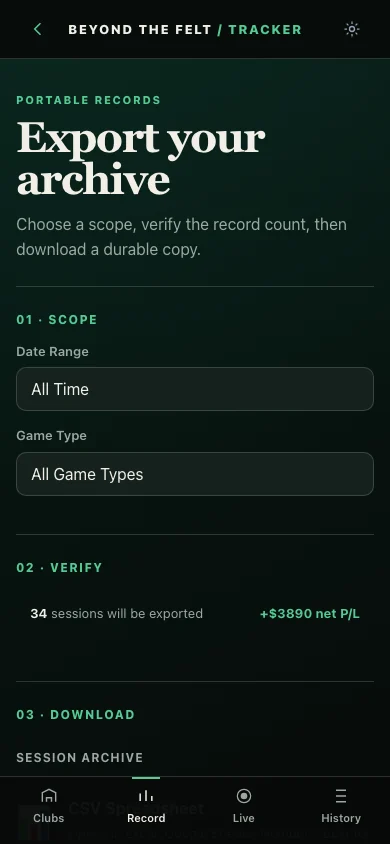
Export your archive screen showing scope, date range, game type, record count, and net profit verification
EXPORTREAL PRODUCT · ILLUSTRATIVE DATA
EXPORT

Keep a portable session archive.

Choose the scope, verify the record count and result, then download your data.

Personal by design

Your tracker is not a public leaderboard.

Session history is organized for the individual user. Beyond the Felt does not process wagers, move gambling funds, publish private results, predict outcomes, or imply that past performance changes the odds.

Beyond the Felt

Start building a record you can actually learn from.

Log the session once. Let the history become useful.